
Yuga Techy Nerd Stuff You Probably Should Know
We get a lot of questions in our Discord about the Yuga tech stack. It’s no mystery: Boring Security was born out of the ApeCoin DAO, so naturally, we keep a close eye on all things Yuga. And since we’re sometimes considered the unofficial Yuga Security tech support, we’ve had to field a ton of questions about the ecosystem. Over the years, we’ve gotten quite a lot of questions about Glyph, Delegation, Tokenproof, and Shadows, so we’re gonna break them each down below!
Let’s get after it…
What and Why Glyph
Glyph is a separate service run by https://www.privy.io/ that Yuga integrated into Otherside. Think of Glyph as a wallet you can use in the Otherside without having to sign every transaction! However, it also helps connect your other wallets so you can reap their in-game benefits. Early tutorials on Glyph will have you go to https://useglyph.io to set up delegation, but we recommend setting it up straight from the Otherside profile page!
Step 1) Navigate to https://otherside.xyz/
Step 2) Sign in and click on the top right-hand corner of your profile photo and name (pictured)
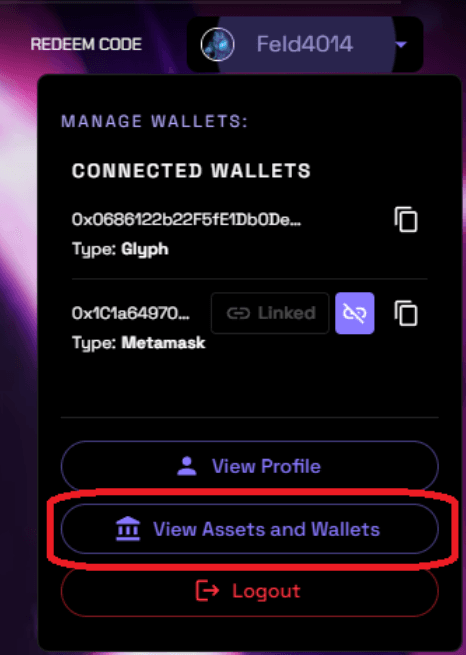
Step 3) Click on “View Assets and Wallets”

Step 4) Click “Link New Wallet”
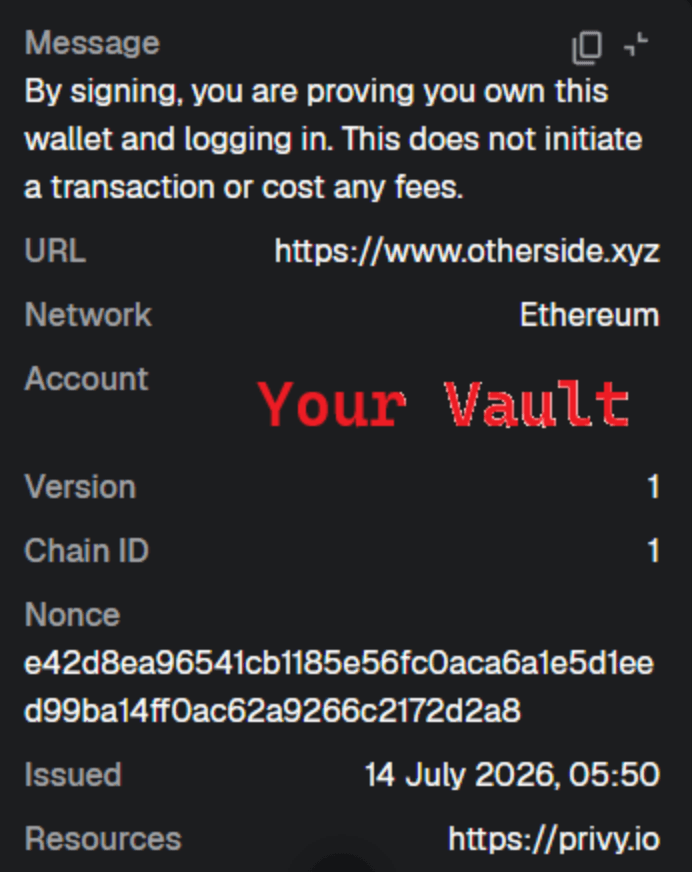
From here, you’ll want to sign the sign-in request (example below). It should look something like this. If it doesn’t, ensure you’re on the correct website, but don’t hesitate to reach out to either Yuga Labs or us for questions.
Common Issues:
My Assets Say “Delegated Away”
That is OK. That simply means you’ve used a service like https://warm.xyz or https://delegate.xyz; as long as you have whatever wallet you delegated to connected to Glyph as well, it shouldn’t cause any issues.
It Says “Wallet is Connected to another account”
You’ll need to disconnect that wallet from the other account first. However, you MUST have a wallet connected to the account to disconnect it. I’d recommend adding another wallet address you don’t use to that account to move it.
Here are some threads/resources related to Glyph:
https://x.com/privy_io/status/1929966773337489676
https://x.com/imjameshall/status/1948537270795206670
Wallet Delegation
 Although we wrote an article about these services back in 2023, it's worth highlighting how they are relevant to the Yuga ecosystem. They still honor delegation for the most part, so if you aren’t connected to Glyph with a particular wallet address, as long as the address they are delegated to is connected, you’ll be fine.
However, there have been small issues, such as the Daniel Arsham drop, that some users who relied on delegation alone might have missed getting entry tickets for not having the original account in the same Glyph account (and only the delegated ones). So it is a good idea going forward to have all of those wallets connected to Glyph, as it requires a similar one-time signature to do the setup!
TokenProof
Tokenproof, a technology that Yuga Labs acquired in 2024, was once its own company, specializing in giving web3 events and other registrations a more familiar “web2” feel. It is still in use today for drops, event registrations, and ApeFest sign-ups! Keep in mind you can use your delegated wallet to sign up for this, so if you already used one of the wallet delegation services above, there's no need to keep signing with your vault wallet!
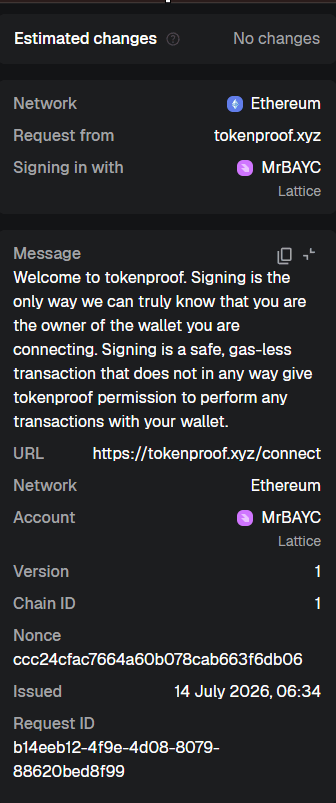
Head over to https://tokenproof.xyz/connect to sign up if you haven’t already. Your initial registration signature should look something like this:
To use Tokenproof, you usually just need to scan a TokenProof QR code that simply proves your ownership. This takes repeated on-chain signatures out of the equation and honors your one-time on-chain attestation made above, so you can use it over and over without having to get out your Hardware wallet! Recommended for all apes!
Shadows
If you reference the ApeChain Docs, it will tell you in short that they ‘replicate ownership across chains’. You can think of Shadow NFTs as a “digital twin” that is soulbound (non-transferable). Unlike the three ownership proof technologies above, you don’t need to DO anything with your soulbound NFTs. They are mostly there to be used by other projects and protocols to easily prove ownership on any chain that supports shadow NFTs, without making a cross-chain call.
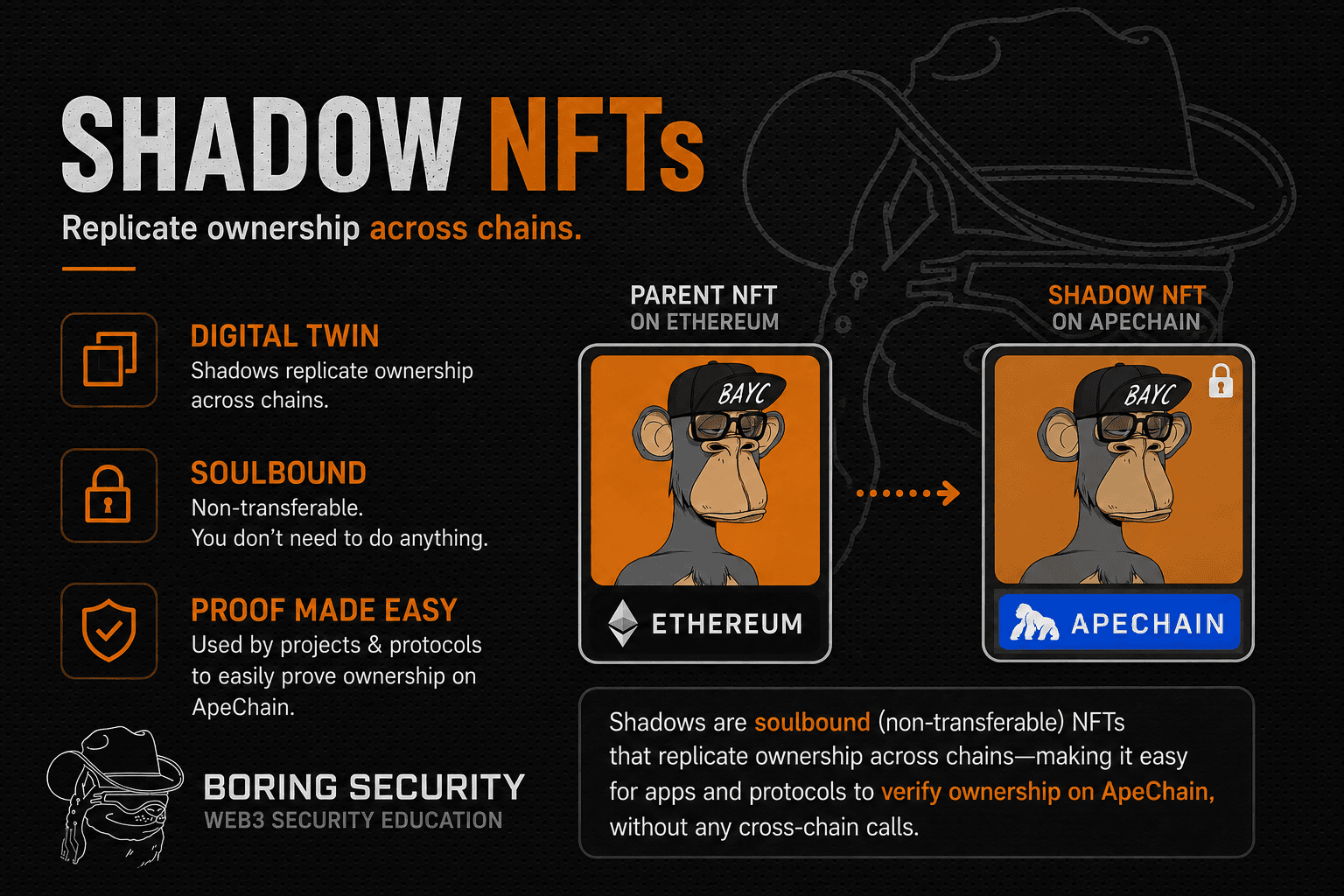
If you’re a dev interested in a more technical explanation, the creator, 0xQuit, wrote a nice thread explaining them and links to some GitHub repositories! What trips most people up about shadows is how they can interact with delegations on delegatexyz, but Quit explains that by default the shadow NFT delegations follow the parent NFT, though you CAN issue a separate shadow delegation; between you and me, I’m not sure why you would. For most people, Shadows just work, and you’ll see them in your wallet when browsing your profile of NFTs on sites like OpenSea.
The Bottom Line
We think all Ape owners should set up a Glyph wallet and Tokenproof. Within that same Glyph account, connect multiple wallets and set up Wallet Delegation to another wallet in your Glyph stack; no need to get fancy with Shadow delegations for most people, just a simple whole wallet delegation using Warm or Delegate.